Tag Archive: daytonastate.edu
I’m introducing a new email forwarding service called Falconmail.me which allows you to share an email address that is 14 characters shorter than Daytona State College’s standard @falconmail.daytonastate.edu student email addresses.
How it works
My email is richard_thripp@falconmail.daytonastate.edu, but if I give out the email address richard_thripp@falconmail.me, email sent to the Falconmail.me address will be directly forwarded to the falconmail.daytonastate.edu by the host.thripp.com mailserver. Then, if you’ve set your Daytona State College email address to forward to your own account (i.e. Gmail or Hotmail), DSC will forward it to you, so the message will be forwarded twice.
I’ve tested this, and it works perfectly for me. I’ve set my server to just forward all email sent to Falconmail.me to falconmail.daytonastate.edu. The only danger is if the Daytona State IT department decides to block Falconmail.me, the forwarding will immediately cease to work. I encourage them not to do this but instead use their own spam filtering, and I may add spam filtering to Falconmail.me in the future. I am also willing to transfer the domain to the college if they will actually use it.
If you are a DSC student, you have an email in the format firstname_lastname@falconmail.daytonastate.edu, so you can immediately begin sharing firstname_lastname@falconmail.me with people to save them some typing. Falconmail.me, DaytonaState.org, and Thripp.com are hosted on a WiredTree Hybrid Dedicated server with over 99.9% uptime, so no emails should be lost.
I will be keeping no records whatsoever of any emails forwarded through Falconmail.me. I set up a domain-level forwarder in cPanel and I have no interest in collecting personal data. I just saw that the Falconmail.me domain was unregistered and I thought it would make a cool service.
.me is a new top-level domain introduced in 2007 for the country of Montenegro, but it is being marketed as a …
... continue reading
Previously, I was trying to sell DaytonaState.org, but now I’ve decided I’m changing my primary email address to thrippr@daytonastate.org. This means I will be keeping DaytonaState.org for the rest of my life, and it is no longer for sale.
Remember last week’s voting event for the new Daytona State College logo? The winner has been announced as the logo with the college seal, but without shadowing. Out of 2718 votes, 1500 students and faculty chose this option:

If you’ve forgotten, these were all the options. The winner is third down:
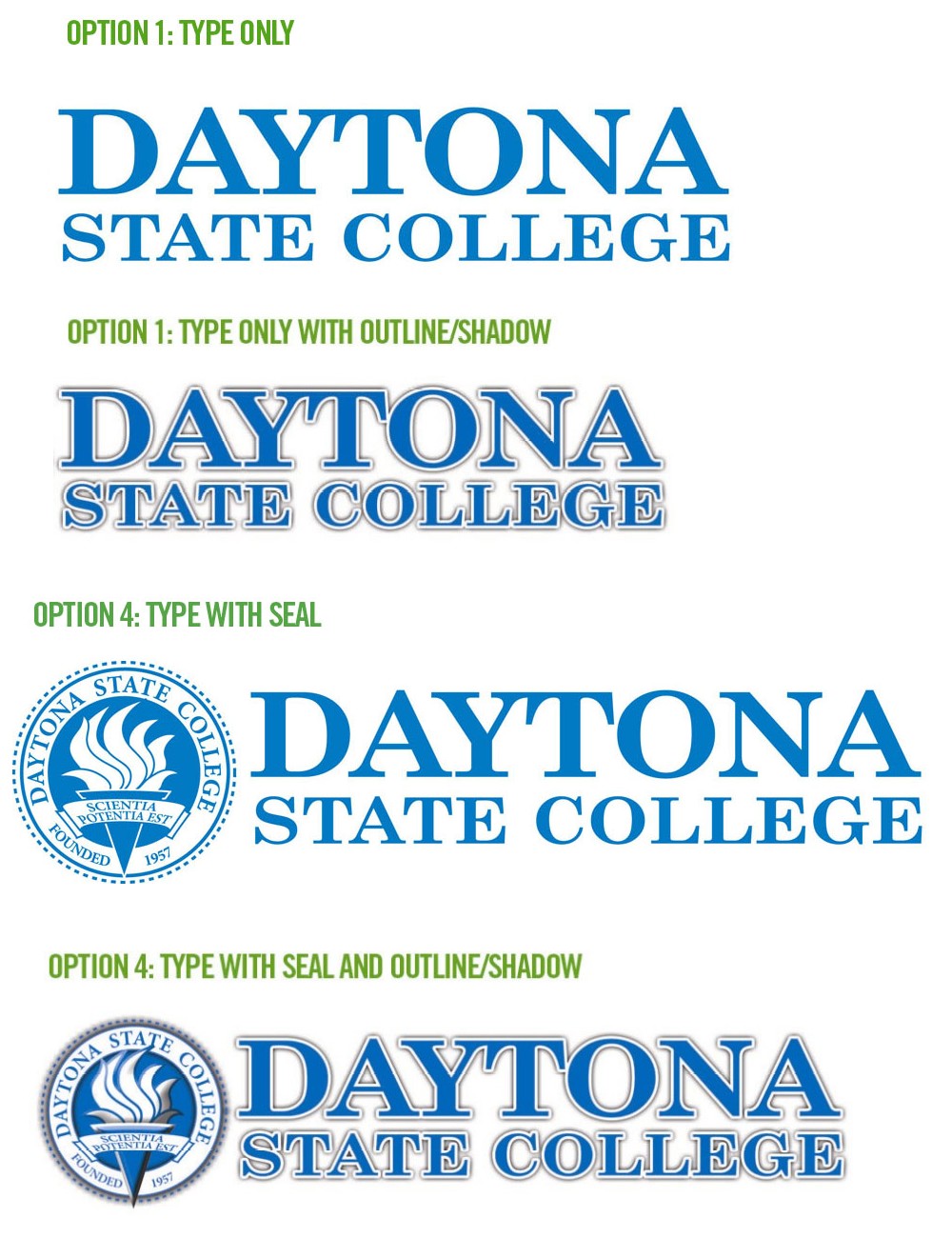
I wanted the bottom one, with the shadowing, to win. It didn’t look good on the voting page (all blocky because of the way they scaled it). That’s why it lost. The one you all picked would’ve been my second choice, though.
I saw this on the Daytona State College home page when I went there today; an event called Pick Our Logo:
“DAYTONA BEACH, FL (Aug. 25, 2008) – Pick Our Logo is a unique opportunity for Daytona State College students, faculty, staff and the community to have a voice in our new logo.”
The college is allowing students to vote their favorite from one of four prototypes for the new DSC logo.

Click the image above to see a bigger version, or go here on the college’s website to see them all.
The immediate problem on the college’s website is that the images are about 1000 pixels wide, but they’re set to be 500 pixels wide in the HTML source code. Many browsers, including Internet Explorer 7 which I’m using now at the college computer lab, use “nearest neighbor” interpolation to scale images down. It looks nothing short of awful.

That’s exactly what logo 4 looks like on my screen. See all the jagged edges? It shouldn’t look like that. How are students supposed to make an informed vote when they’re seeing bastardized versions of the logos?
I know logo #4 is the best and most appealing choice, so I voted for it. It won’t win though because it looks the worse when scaled with the nearest neighbor algorithm. Hopefully some of the students use the newer Mozilla Firefox 3, which has upgraded to bicubic resampling.
Another problem is that the logos say “Option 1,” “Option 1,” “Option 4,” and “Option 4,” when it should be 1, 2, 3, 4. Everyone makes mistakes, but this is plain sloppy.
Either way, I’m glad that the college is going to its students for this decision. Vote here now; the opportunity ends in 27 hours …
... continue reading
MVSmith asked this question over in the Daytona State College forum:
Virtual College
Where did it go?
I’m signed up for Sociology via online with the VC and not only have I not yet heard from the professor, but the links I have to the VC no longer work. On top of that, I’ve been searching the new site for DSC and there’s nothing there (that I’ve found anyways).
So, if we have a class online, how do we get to it?
It’s a good question. The new virtual college is confusing. My Physics professor, Dr. Gajendra Tulsian, asked a student to log in to his account on Monday for a demonstration. He didn’t know how, the next student didn’t either, and the system wasn’t even working for the last one. Barring problems on the college’s end, here’s the reply I wrote detailing the steps:
They do make it confusing, I know. Here’s what to do:
1. Go to class.daytonastate.edu.
2. Enter your user name as first initial, last name, last three digits of student ID. Mine is rthripp658, for example.
3. Enter your password. I think this is your Falconmail password. Use the Forgot Password link if you need to, and the system will email your password to your Falconmail account.
And to log in to your Falconnet account, click the “Falconnet” button at the top of the daytonastate.edu home page, log-in with your Student ID and password as birth date (081791, for example), click the big “Check Email” button toward the top-right, click “Continue…”, and finally, click “Inbox.” Too many steps, I know.
Once you’re in at class.daytonastate.edu, there are even more steps. Under “My Courses,” you may have to click the little plus sign to the right of “FA08″ (for Fall 2008) to get your course list to appear. Then, click the course you
…
... continue reading
“Eight-week schedules - accelerate degree completion by taking eight-week classes instead of the traditional 16-week class in a semester.”
I’m sorry, that just doesn’t cut it. It has no heart, no spirit, no feeling. It sounds cheap, shallow, and robotic. It should be this:
“Eight-week schedules available for ambitious students. Do you pick up new skills quickly? Learn at a faster pace with more rigorous and engaging courses.”
I hope they change it to my suggestion. State-funded colleges can be bad at self-promotion, but we can change that. The page the quote is from is their save gas initiative, where you save gas by taking online courses (clever, huh?). Check it out. I like the “comprehensive college experience” part.

Am I the only one who thinks this photo on the Daytona State College home page is ugly? She’s a pretty lady with a nice smile, but she’s squinting. Not even that makes the photo bad, though. The terrible JPEG artifacts around her eyes make it ugly. Why would they do this? There’s no reason for visible artifacts. Did they compress this 8 times in a row or something? At 27KB, the file size isn’t even small for the image’s size and algorithmic complexity. There’s no reason for it to look like this.
If you’ve seen daytonastate.edu anytime recently, you’ve noticed that the home page randomly displays one of three photos of students. The other two are fine. This one needs to go; or they need to go back to the source file and save a clean copy.
I’m surprised “YourSpace” is one word. Is Daytona State competing with MySpace? I can only wonder why a college with such wonderful English professors doesn’t use proper English on its home page.
I got this support request from Bob in my email account on the 1st. I’ve been on a self-imposed vacation, so I didn’t get to read it till today:
Hi,
My name is Bob. My daughter, Amy, will start at DB next semester. I am able to connect to the DB website from work, but at home it’s a different story. We attempt to connect at both dbc.edu and daytonastate.edu but all we get is the white screen of “duh” before timing out. At first I thought this may be Vista attempting to protect me from the evils that lurk behind the scene at DB, but Amy’s computer runs on XP and she has the same connectivity issue. Is there something I’m missing here? Any help is appreciated.
Thanks.
Bob
My reply:
Hello Bob,
Sorry for not getting back to you quicker; I’ve been on a vacation from email and my website.
While the requirements for the virtual college are higher, the main site is plain old HTML, CSS, and JavaScript, so it should load fine. Since it’s not, it’s either the college, your Internet provider, or your computer that’s having problems. daytonastate.edu has been working fine for me, so it’s likely not the first, and your Internet provider is unlikely to be blocking the college. So it comes down to your computer.
If you have firewall software, shut it off (usually by right-clicking the icon in the system tray, and then left-clicking “disable”). If the college site works, you know it’s the program’s fault. Look for a “whitelist” or “allowed sites” page in the options, and add daytonastate.edu to the list. This should keep the firewall from blocking you.
If you use Mozilla Firefox, try accessing it in Internet Explorer, and vice-versa.
Try accessing the site at the old address, http://www.dbcc.cc.fl.us/ .
If you have a
…
... continue reading